Using ECG+ on iPad: how your ECGs get there, and why it takes a while
ECG+ runs on iPad, and for actually looking at an ECG it is the nicest screen you own. A 30-second trace that you have to pinch and drag across on a phone opens up on an iPad, and the report you take to your doctor is far easier to read at that size.
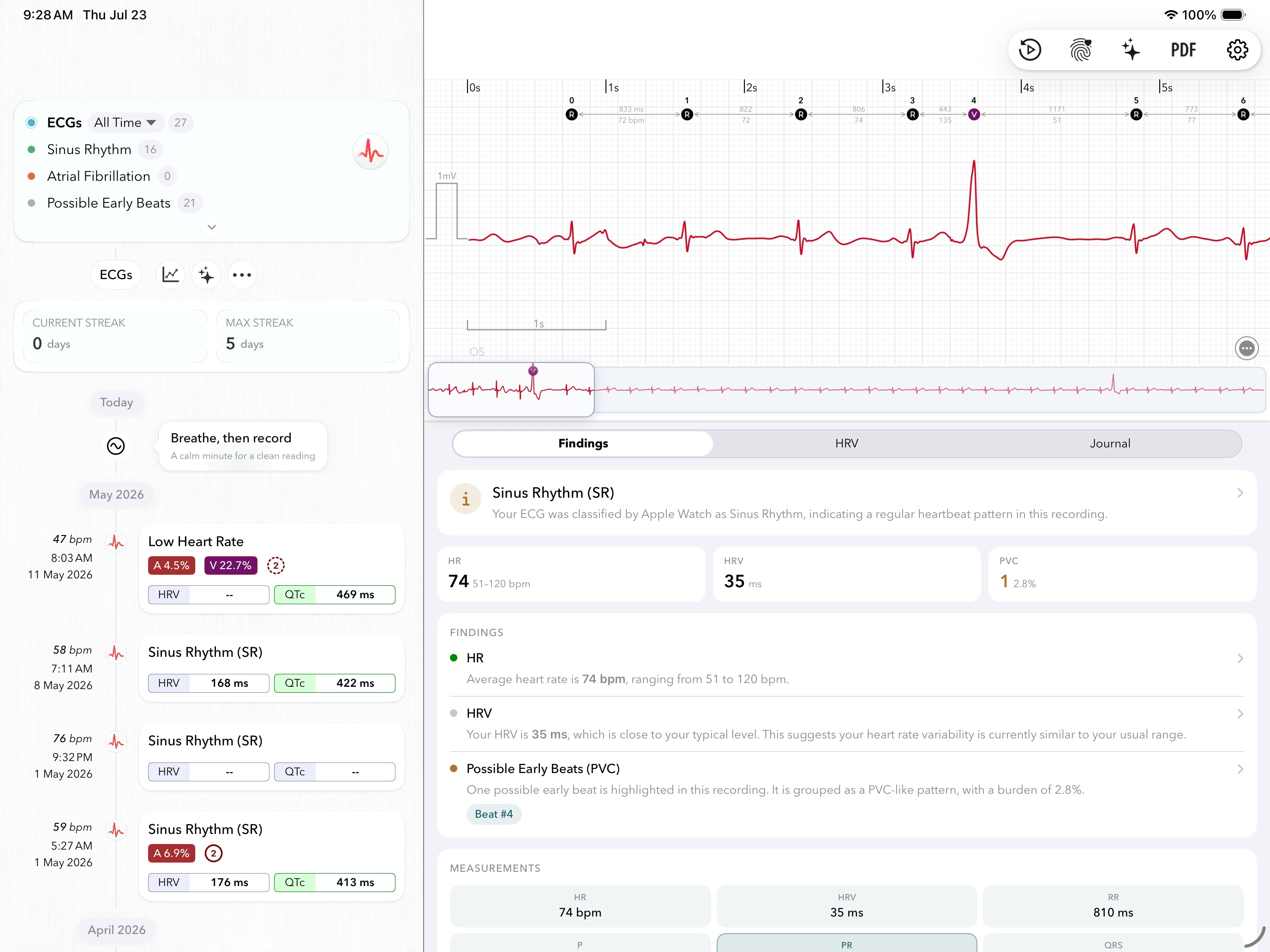
There is one thing that surprises almost everyone: a recording you just took on your watch shows up on your iPhone quickly, and then seems to take forever to reach the iPad. That is normal, it isn't a fault in ECG+, and once you know the route your recording travels it becomes obvious both why it lags and what actually speeds it up.
The short version: your iPad is one hop further down the line than your iPhone, and Apple keeps Health data locked up tightly enough that a sleeping iPad can barely take any of it in. Unlock the iPad, open Apple Health, and leave it awake on Wi-Fi for a few minutes. That single habit fixes most of the wait.
The route a recording takes to your iPad
An Apple Watch pairs with an iPhone, and only with an iPhone. It has no relationship with your iPad at all. So nothing travels directly between them, and every recording makes the same three-step journey:
- Apple Watch → iPhone. The recording transfers to your paired iPhone's Apple Health over the watch's own connection to it, Bluetooth when they're close, Wi-Fi when they're apart. This first hop doesn't involve iCloud, which is why a new recording turns up on your phone so quickly.
- iPhone → iCloud. Your iPhone uploads the new Health data to your iCloud account, in the background, when it gets a suitable moment. This is the step that needs iCloud Health sync switched on, and it's the one people most often have turned off without realising.
- iCloud → iPad. Your iPad downloads it, again in the background, and again only when it gets a suitable moment.
Your iPhone is finished at step one. Your iPad has to wait for all three, and each handover happens on Apple's schedule rather than on demand. That alone accounts for most of the difference in how "instant" the two devices feel.
Why the iPad in particular is slow
The deeper reason is that Apple treats Health data as some of the most sensitive data on the device, and protects it accordingly. Two of those protections have a direct effect on how quickly your iPad catches up.
Health data is locked away while the device is locked
Health records sit in a protection class that Apple describes as Protected Unless Open. In practice: about ten minutes after the device locks, it gives up access to that data, and it can only get at it again the next time you unlock with your passcode, Face ID or Touch ID.
Think about what that means for the two devices. Your iPhone comes out of your pocket dozens of times a day, so it is constantly being handed fresh opportunities to file new Health data away. Your iPad may sit on a shelf, locked, for two days straight. During all of that time it is in the worst possible state for receiving Health data. It isn't broken and it isn't ignoring you, it simply has no opening to work with.
This is also why the iPad so often appears to "catch up all at once" the moment you pick it up. It isn't a coincidence. Unlocking it is the event that lets the backlog through.
Health data is end-to-end encrypted
Health data syncs with end-to-end encryption, which Apple requires two-factor authentication for. Not even Apple can read it in transit. That is exactly what you want for ECG recordings, and we would not trade it away for speed, but it does mean the sync is stricter than an ordinary photo library: the iPad has to be a fully trusted, passcode-protected member of your Apple Account before it can decrypt a single recording.
If an iPad has no passcode set, or the account isn't on two-factor authentication, Health data will not flow to it properly no matter how long you wait.
How to make it arrive faster
You can't force a sync in ECG+, or in Apple Health, because Apple doesn't offer a "sync now" button anywhere. What you can do is put the iPad into the state where the sync is allowed to run, and then give it a few minutes.
- Unlock the iPad and keep it awake. This is the one that matters most. Keep the screen on rather than letting it lock again while you wait.
- Get it on Wi-Fi, and on power if you can. Background transfers are scheduled far more generously on a charging device.
- Open the Apple Health app on the iPad and go to Browse → Heart → Electrocardiograms (ECG). Leave it open for a couple of minutes. Health being frontmost is your best chance of the new recordings landing.
- Check the iPad is on the same Apple Account as your iPhone. Health only syncs between devices signed in to the same account.
- Check Health sync is on, on both devices: Settings → your name → iCloud → See All → Health. It has to be on for the iPhone (so the recording gets uploaded) as well as the iPad (so it gets downloaded). If it's off on the iPhone, nothing will ever reach the iPad, however long you leave it.
- Make sure the iPad has a passcode and your account uses two-factor authentication, as above, Health's encryption depends on both.
- Then open ECG+. It reads whatever Apple Health holds at that moment, so once the recording is in Health, it's in ECG+.
A realistic expectation. With the iPad awake, unlocked and on Wi-Fi, recent recordings usually come through in a few minutes. If your iPad has been asleep for days, expect the first catch-up to take longer, and expect it to arrive in a batch rather than one at a time.
Telling a slow sync apart from a real problem
There is one check that separates "still on its way" from "something is actually wrong", and it takes ten seconds. Look in the Apple Health app rather than in ECG+, on both devices.
- In Health on the iPhone, but not in Health on the iPad? That is an ordinary sync delay. Work through the steps above, it will arrive.
- Missing from Health on the iPhone too? Then it never got past step one, and the iPad is not your problem. That is a different fault with a different fix: see why ECG+ stopped showing your new ECGs.
- In Health on the iPad, but not in ECG+? Rare, since ECG+ re-reads Health each time it opens. Check no filter is hiding it, then contact support and we'll look into it with you.
The reason this check works is that ECG+ never stores your recordings. It reads them from Apple Health and nothing else, so whatever Health is showing you on that device is exactly what ECG+ has to work with. If Health doesn't have it, no amount of reopening or reinstalling ECG+ will conjure it up.
What the iPad is genuinely better for
Given the wait, it's worth being clear about when the iPad is the right device to reach for. It isn't the one to grab in the moment you feel a palpitation, that is what the watch and phone are for. It comes into its own afterwards:
- Looking closely at the trace. Small features, a faint P wave, a subtly inverted T wave, the exact shape of a premature beat, are far easier to judge at full size.
- Reviewing a run of recordings side by side, rather than one screen at a time.
- Preparing for an appointment. Reading through the report before you go, and having something legible to put in front of your doctor. See also what to ask your doctor.
Used that way, the sync delay stops mattering. You are looking at recordings from earlier in the week, not from ninety seconds ago.
Frequently asked questions
Does ECG+ work on iPad?
Yes. ECG+ runs on iPad with iPadOS 18.0 or later, and reads your Apple Watch ECGs from the Apple Health app on the iPad, exactly as it does on iPhone. The larger screen is the most comfortable way to examine a trace closely, or to read the report before an appointment.
Why do my ECGs take so long to appear on my iPad?
Your iPad is one hop further down the line: a recording goes watch → iPhone → iCloud → iPad. The first hop is quick, because the watch talks straight to its paired iPhone, but the two iCloud handovers after it run in the background on Apple's schedule rather than on demand. On top of that, Health data is protected so that the device gives up access roughly ten minutes after it locks, and regains it only when you unlock. A locked iPad therefore has almost no opportunity to take new Health data in, which is why it seems to catch up all at once when you pick it up.
Can I record an ECG on my iPad?
No. The recording is always made by the Apple Watch, and an Apple Watch pairs only with an iPhone. The iPad is for reading and reviewing recordings that already exist, not for taking them. If you need a recording right now, use your watch.
Is there a way to force a sync?
Not directly, Apple provides no "sync now" control for Health data, in any app. What works is putting the iPad into the state where the sync is permitted to run: unlocked, awake, on Wi-Fi and preferably on power, with the Apple Health app open. Then give it a few minutes before opening ECG+.
Do my recordings sync any faster if I pay for more iCloud storage?
No. The delay is about when background syncing is scheduled and when the device can decrypt Health data, not about how much room you have. Storage only becomes relevant if your iCloud account is completely full, at which point syncing can stall altogether, which is worth ruling out if nothing is arriving at all.