Heartbeat navigator: find any beat in your Apple Watch ECG
The Heartbeat navigator is an ECG+ original feature, introduced in version 1.9.3 on November 5, 2024. It's the little minimap that runs along the bottom of your recording, a bird's-eye view of all 30 seconds at once that lets you scrub through the strip and jump straight to any beat, even on a small phone screen.
The problem: 30 seconds is a long strip on a small screen
An Apple Watch ECG is about 30 seconds long, roughly 30 to 40 heartbeats laid out end to end. To read each beat clearly you have to zoom in, and once you do, only a few beats fit on the screen at a time. That's where it gets disorienting: scroll a little and every beat looks much like the last, with nothing to tell you where in the recording you are. Was that early beat near the start, the middle, the end? Scrolling back and forth to find it again is slow and easy to lose your place in.
What the Heartbeat navigator does
The navigator solves that by showing the entire recording in miniature along the bottom of the screen, with a highlighted window marking the slice you're currently zoomed into. It works like the minimap in a map app:
- See the whole strip at a glance: all 30 seconds compressed into one overview, so you always know roughly where you are.
- Scrub to any moment: drag the highlighted window, or tap anywhere on the minimap, and the main view jumps straight there.
- Never lose your place: the window shows exactly which beats are on screen relative to the full recording.
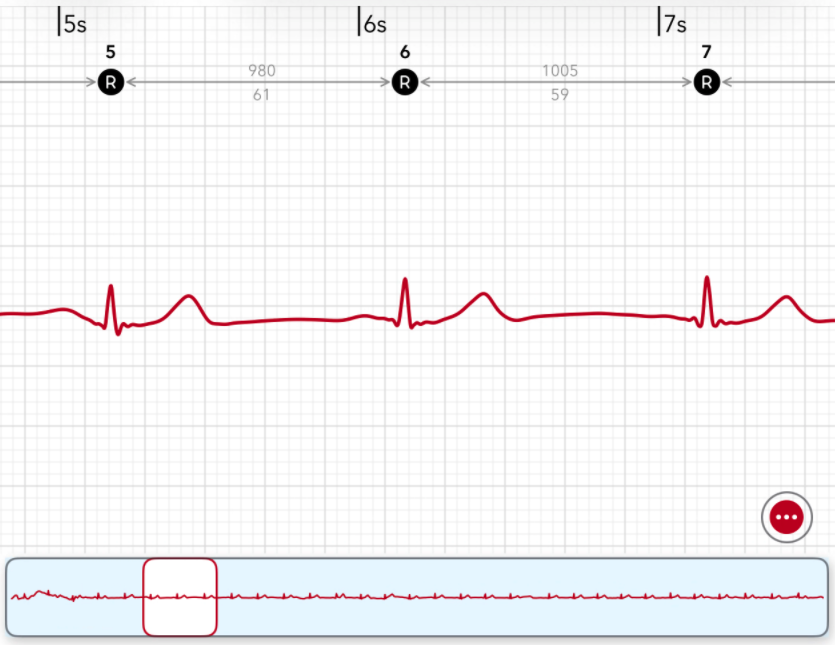
The strip along the bottom is the Heartbeat navigator: the full recording in miniature, with the highlighted box marking the section you're zoomed into above. Drag it or tap the minimap to jump anywhere in the 30 seconds.
Jump straight to the beats that matter
The navigator isn't just for moving around: it's for finding the beats worth a closer look. ECG+ flags abnormal beats like PACs and PVCs, and the navigator lets you go straight to them instead of scrolling the whole strip hunting for the one beat that looked different. Combined with the on-strip annotations, the R markers, RR intervals and A/V icons: you can spot an early beat in the overview and zoom right in to read its timing, all without losing the thread of the recording.
Part of the same idea
Like the on-strip annotations and the Heartbeat Signature, the navigator exists to make your own recording easier to actually read. Your Apple Watch hands you a long, uniform waveform; ECG+ gives you the tools to move through it, understand it, and find what matters, turning a strip you'd otherwise skim into one you can genuinely explore.
Note: the Heartbeat navigator is a tool for reviewing your own Apple Watch ECG and is not a diagnosis. ECG+ helps you find and understand beats in your recording to share with a clinician; see the disclaimer and talk to your doctor about any health concerns.