EMG artifact (muscle activity) on Apple Watch ECG
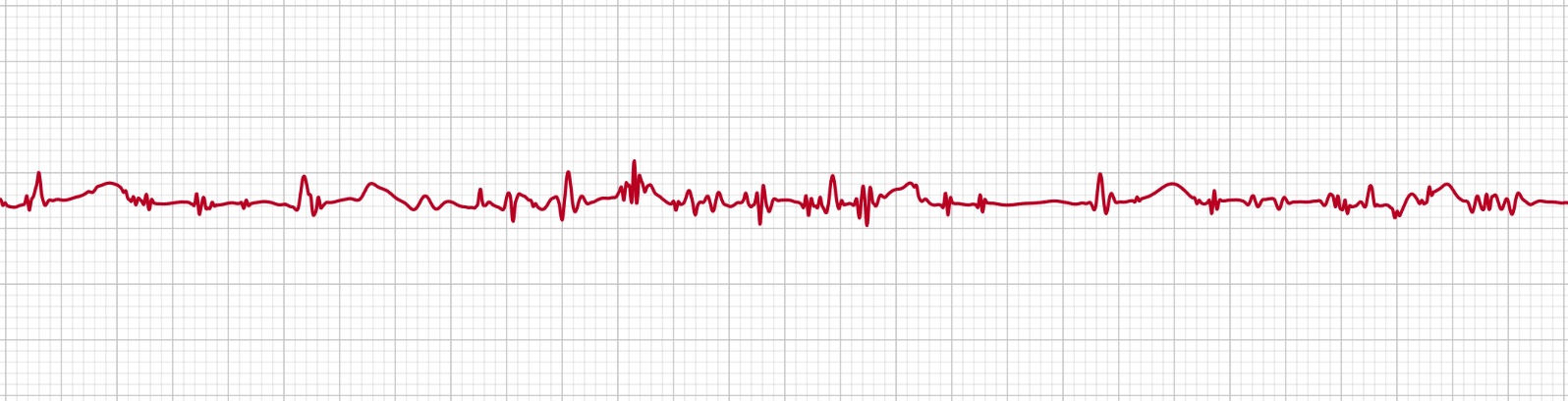
If your Apple Watch ECG looks fuzzy, jagged or full of fine spikes, as if static had been laid over the heartbeat: you're most likely seeing EMG artifact. EMG stands for electromyographic: electrical noise from your muscles. Like baseline wander, it's a recording artifact, not a heart problem, and it's almost always down to how the recording was taken. Here's what causes it, why it matters, and how to get a clean trace.
What is EMG artifact?
Your heart isn't the only thing in your body that produces electrical signals: so do your skeletal muscles whenever they contract. The Apple Watch ECG electrodes can't tell the two apart, so any tension or movement in your arm, hand, shoulder or jaw gets picked up alongside the heartbeat. The result is a layer of rapid, irregular, high-frequency noise, often described as "fuzzy" or "spiky", riding on top of the trace.
What causes it
- A tense or unsupported arm: holding your arm up, or keeping it rigid, keeps the muscles firing the whole time.
- Gripping or pressing too hard on the Digital Crown tenses the hand and forearm.
- Shivering, cold or tremor: even fine muscle tremor adds continuous noise.
- Talking, moving or fidgeting during the 30 seconds.
- An awkward posture: leaning on the recording arm or hunching the shoulder.
Why it matters
EMG artifact can bury the small, precise features of the ECG, the P wave, the exact edges of the QRS complex, the T wave, under noise. When the trace is heavily affected, those details are hard to read accurately, and a very noisy recording can even come back as inconclusive or a poor recording. It doesn't mean anything is wrong with your heart, but it can make the recording less useful, so it's worth taking a calmer one.
How to reduce it
- Sit down and get comfortable before you start, being relaxed is the single biggest factor.
- Rest your forearms on a table or in your lap so no muscle is holding your arm up.
- Let your hand go loose: touch the Digital Crown lightly; don't grip or press.
- Stay warm: if you're cold or shivering, warm up first to stop muscle tremor.
- Keep still and quiet for the full 30 seconds, no talking, no fidgeting.
How ECG+ handles EMG artifact
ECG+ applies filtering to reduce high-frequency muscle noise while preserving the genuine shape of the heartbeat, so a recording with mild EMG artifact can still be read clearly. Filtering can't recover a trace that's overwhelmed by noise, though, for those, the reliable fix is a second, more relaxed recording using the tips above. For broader help getting a clean reading, see our guide on how to use ECG on Apple Watch.
Frequently asked questions
What is EMG artifact on an ECG?
EMG artifact is electrical noise picked up from your muscles during an ECG. Because the electrodes can't tell heart signals from muscle signals, tension or movement in your arm, hand or shoulder shows up as fuzzy, spiky interference on the trace.
Does EMG artifact mean something is wrong with my heart?
No. EMG artifact is a signal-quality issue from muscle activity, not a heart problem. It can hide real features of the trace, though, so a relaxed re-recording is the best response to a very noisy one.
How do I get rid of muscle noise on my Apple Watch ECG?
Sit down, rest your forearms on a table or your lap, and let your arm and hand go completely loose. Don't grip, press hard or hold your arm in the air, and stay still and quiet for the full 30 seconds.